How to Create a QR Code Menu for Your Restaurant
 Sophia Johnson
Why should you create a QR code for your restaurant's menu?
A QR Code Menu is a great way to provide your customers with quick and easy access to your restaurant's menu.
You can give them easy access to your menu directly on their smartphones. This has multiple advantages:
- Cost effectiveness: you can easily update and change your menu as needed without the need to reprint expensive paper menus.
- Sustainability: it's significantly greener to cut down on paper waste
- Convenience: customers do not have to wait for a waiter in order to start choosing their preferred menu items
- Safety: with the recent COVID pandemic, serving QR code menus has become the de-facto standard
- Social: influencers can easily incorporate your menu in their posts for their followers to see
How to create your menu QR code for free in 4 simple steps
1. Save your menu as a PDF file in Google Drive
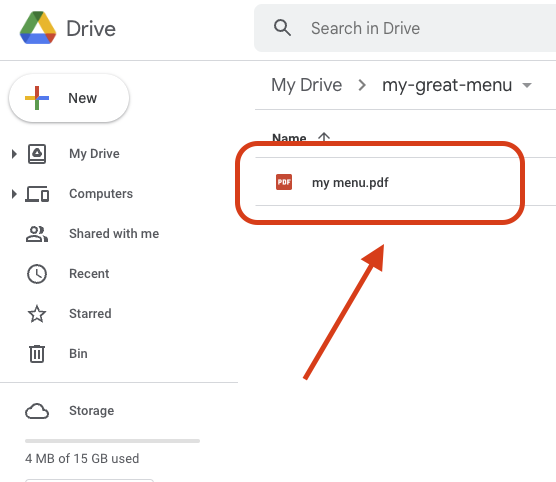
Export your menu file as a PDF. Based on your preferred document editor, this part of the process might change slightly. Here is a guide on how to export a Word document to PDF.
If you have an agency who is supporting your business in preparing your restaurant's menu, you should reach out to them to ask them for a PDF file.
You can then head to Google Drive and upload your file by dragging it to the browser's window.
2. Get a publicly shareable link to your PDF file
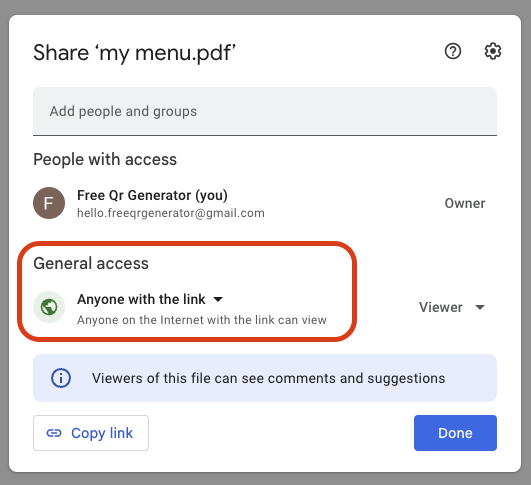
This is the hardest part of the tutorial. Don't worry - I'll walk you through each step!
- Right click on the file you have previously saved on Google Drive.
- Select
Get Linkoption from the dropdown - Under the section
General accessclick on the lock icon where you can seeRestricted - Change it to
Anyone with the link, and make sure the dropdown on the right handside saysViewer(this should be the default option, but it's better to double check) - Make sure you click the
Copy linkbutton in the bottom left corner - Click the blue
Donebutton in the bottom right corner
3. Generate QR code using Free QR Generator

It's time to use our great QR Generator tool!
- Go on our main website
- Paste the link you have previously copied in the main field of our website
- Download the generated QR code
4. Print your QR code and show it to everyone!

Once you have downloaded your QR code, it's time to be creative. You can use a great tool such as Canva to add it to an existing graphic. Alternatively, you can import the downloaded image in Word and print it at home with your printer.
5. Scan your QR code
Check out our article on how to scan your QR code to make sure everything is in order!
Closing thoughts
Creating a QR code for your restaurant's menu is a free, quick and easy way to increase engagement with your customers and increase their satisfaction. This is something we know very well at Free QR Generator. You can get started for free and start growing your business with our tools.
Credits:
- GooDocs for their great Coffee Shop Sample menu
- Photo by Rendy Novantino on Unsplash
- Photo by Alba Lantigua on Unsplash